


A9Play Registration – Create Your Account Today
How to Register on A9Play
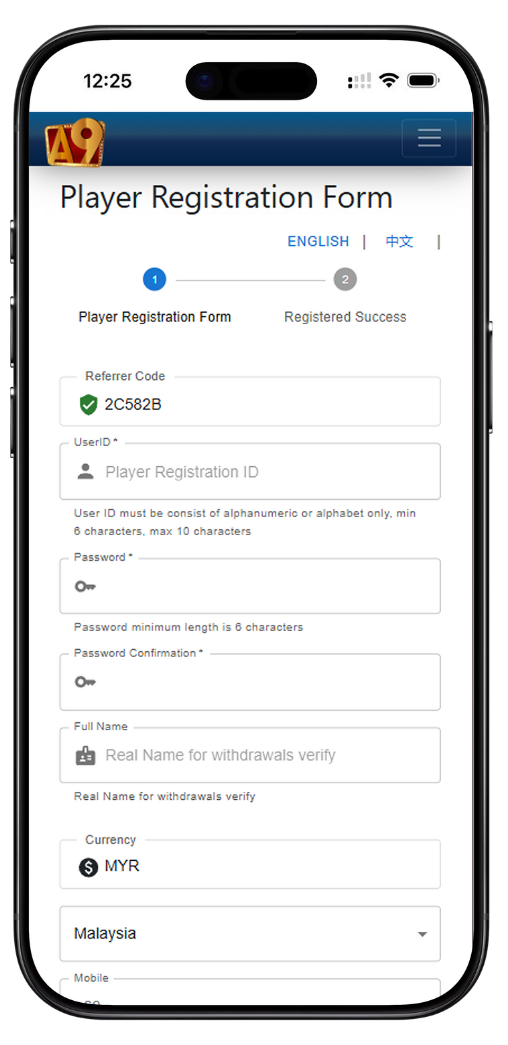
Follow this easy step-by-step guide to complete your A9Play registration. The process is quick, secure, and designed to help you start playing instantly once your account is verified.
Step 1: Enter Your Referrer Code
Begin your A9Play registration by entering the valid Referrer Code in the designated field. This code connects your account to your referring partner and ensures proper tracking.
Step 2: Create Your User ID
Choose a unique User ID for your A9Play account. It must contain only alphanumeric or alphabetic characters and be between 6 to 10 characters in length.
Step 3: Set and Confirm Your Password
Enter a secure password (minimum 6 characters) and confirm it in the "Password Confirmation" field. Strong passwords help protect your A9Play account from unauthorized access.
Step 4: Provide Your Full Name
Enter your real full name exactly as shown on your identification documents. This is required for verification and withdrawal purposes.
Step 5: Choose Your Currency and Country
Select your preferred currency (e.g., MYR) and country (e.g., Malaysia). Then input your valid mobile number including the country code.
Step 6: Choose OTP Verification Method
Select one of the verification options: OTPq (App), WhatsApp OTP, SMS OTP, or Send OTP to Operator. A9Play recommends using the OTPq App for the fastest and most reliable verification.
Step 7: Verify with OTP
Once you click "Request OTP", enter the code received in your OTPq App or through your selected channel. This confirms your identity and completes your registration.
How to Set Up OTPq App for A9Play Verification
Step 1: Download OTPq App
Download the "OTPq" app from the Play Store, Huawei Store, or Apple Store. This app allows you to receive verification codes securely for your A9Play account.
Step 2: Verify Your Registered Number
Open the OTPq App and verify your phone number via WhatsApp or SMS.
Step 3: Request OTP in A9Play
Once your OTPq App is verified, click "Request OTP" in the A9Play registration form. You will receive a one-time code in the OTPq App.
Step 4: Enter OTP and Complete Registration
Enter the OTP code in the provided field and click "Register Now". Upon success, your A9Play account will be activated, and you can log in immediately.
Tips for a Smooth A9Play Registration
Ensure Accurate Information
Always use your real name and valid contact details. This helps with account verification and ensures successful withdrawals in the future.
Check OTP Delivery
If you do not receive an OTP, check your internet connection or verify your number again in the OTPq App before retrying.
Secure Your Account
Avoid sharing your User ID or password with others. A9Play uses encrypted login methods, but user caution is equally important.
Why Register with A9Play?
A9Play offers a safe and exciting online gaming experience. By registering, you unlock exclusive rewards, fast deposits and withdrawals, and 24/7 support — all protected by Cloudflare and OTPq security.
Register for A9Play Now
Complete your registration in minutes and start exploring the best games and rewards A9Play has to offer. Follow the easy steps above to verify and activate your account today.
REGISTER NOW